
After personally trying the online cloud – I have to say it’ s one if the best – simplistic, yet powerful tools for enhancibg creativity and maintaining writer’ s motivation;
From free version – to paid plans/ upgrades;

Reedsy.com;



After personally trying the online cloud – I have to say it’ s one if the best – simplistic, yet powerful tools for enhancibg creativity and maintaining writer’ s motivation;
From free version – to paid plans/ upgrades;
Reedsy.com;

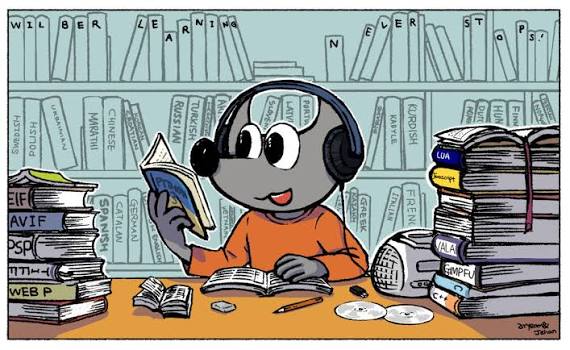
GIMP is a cross-platform image editor available for GNU/Linux, macOS, Windows and more operating systems. It is free software, you can change its source code and distribute your changes.
Whether you are a graphic designer, photographer, illustrator, or scientist, GIMP provides you with sophisticated tools to get your job done. You can further enhance your productivity with GIMP thanks to many customization options and 3rd party plugins.
GIMP provides top-notch color management features to ensure high-fidelity color reproduction across digital and printed media. It is best used in workflows involving other free software such asScribus and Inkscape.


GIMP provides extensibility through integration with many programming languages including Python, Scheme, and more.
The result is a high level of customization as demonstrated by the large number of scripts and plug-ins created by the community.

⌚ Timestamps 0:00 Introduction 0:53 Download & install GIMP 1:26 Main interface 4:41 Top Menu 6:33 Customize interface 8:14 Create new file 9:38 Save as xcf 10:21 View shortcuts 10:58 Import sample image files 11:24 Layers 13:09 Scale / resize image 14:14 Bucket fill tool 15:34 Opacity 16:32 Selection tools 20:22 Text tools 22:03 Add text drop shadow 22:34 Group layers 23:21 Remove image background 25:52 Flip image 26:20 Alignment tool 26:48 Adjust colors – curves 29:51 Crop tool 31:27 Move text 31:55 Paintbrush tool 34:33 Gaussian Blur 35:13 Export as .png, .jpeg, or .gif 36:07 Wrap up
#GIMP; #FREE; #Photo/ Image Editing; #Software (Windows, Mac, Linux), #Scribus – Writing and#Inkscape; #tech, #Graphic Design, #Beginners;

The professional graphic design program Affinity will be available for free, with no subscription required.

And according to its new parent company, Canva, it’s going to stay that way. Forever.
Affinity can be used to create professional-quality vector designs, edit photos and work on other graphic design projects. This relaunch also brings all of Affinity’s apps together on one platform, along with a new icon, file names (which will be .af), and the ability to customize your layout within the app. Subscriptions to Affinity’s apps previously started at $70 per month.

https://www.affinity.studio/resources
#Tech, #news, #Design, #Affinity; #Software, #Free – with Canva account;
About Ellipsus:
We’re building Ellipsus as a platform that prioritizes transparency, trust, independence, and creative freedom. Writers shouldn’t have to trade their privacy or their ownership for good tools. The rise of AI scraping and big tech overreach only made that more urgent for us. —Rex at Ellipsus
Whatever your attitude toward emerging technologies, we can probably agree it’s tough to be online these days. The tools available seem to be multiplying for some and dwindling for others—particularly for those who don’t want to use generative AI. A growing distrust of big tech is leading people to search for less exploitative options than Google or Microsoft.
Fortunately for them (and also me), new developers are creating tools that don’t push AI without the opportunity to opt-in. One of those new tools is Ellipsus, a writing tool created by a small group of writers who wanted better collaborative document options, and who are solidly for transparency, privacy, and writers’ rights to their own work.
As a text editor, Ellipsus is a lot like Google Docs, but more focused on better performance for large docs. It’s got a git-style feature for better version control, richer permissions, flexibility, and creative customizations. It’s got a unique knack for supporting real-time collaboration, and is simple enough to start using right away.
Ellipsus has been very clear on their stance: no generative AI in the program, ever. They believe writers’ work shouldn’t be harvested to train models without consent. Generative AI, when built on creative labor, undermines originality, and they believe putting it inside a writing tool would be fundamentally counterproductive to fostering genuine voices. Ellipsus’s creators want it to be a safe space for writers, and are working on offering better encryption and privacy protections, too.
Ellipsus has a vibrant Discord community of writers providing mutual support, betas, collaborators, and the opportunity to commune. Collaboration options in the documents themselves are pretty fun too—I love being able to create different drafts for different beta readers so no one has to feel put on the spot.
And another small but mighty feature is the variety of different skins you can apply to your program.
#Writing App; #Ellipsus; #App;


https://apps.apple.com/de/app/inkjot-easy-fun-writing/id1603242665?l=en-GB – COOL APP for Beginners Writing and Note-taking;


STYLISH TEXT – APP – O. GOOGLE PLAY:
https://play.google.com/store/apps/details?id=com.theruralguys.stylishtext&hl=en-US&pli=1


In case of having an older computer- such as an Apple or other computers from or 10 years ago – you may try using Elementary OS system – that is if you find the person to change your operating system to this elementary – based on Linux;
Technically speaking, we could save many old computers from being thrown into landfill- thrown or unused.

(Source Wikipedia)
Elementary OS (stylized as elementary OS) is a Linux distribution based on Ubuntu LTS. It promotes itself as “thoughtful, capable, and ethical computing”[4] and has a pay-what-you-want model.[5][6] The operating system, the desktop environment (called Pantheon[2][3]), and accompanying applications are developed and maintained by elementary, Inc.[7][8]
The human interface guidelines of the elementary OS project focus on immediate usability with a gentle learning curve, rather than full-fledged customization.[9] The three core rules the developers set for themselves were “concision“, “accessible configuration” and “minimal documentation”.[9]
Since its inception, elementary OS has received praise and criticism for its design. Wired claimed that it closely resembled macOS, visually and in user experience.[10] The elementary developers say that while it may look like macOS at first, they have a lot of differences.[11]
Pantheon’s main shell is deeply integrated with other elementary OS applications, Web (the default web browser based on GNOME Web)[12] and Code (a simple text editor).[13][14] Pantheon uses Gala as its window manager,[15] which is based on Mutter.[15]
Simply bought an Older Mac – which seemed sort of usable- could barely even browse the internet – however, after trying to install several operating systems – the only one which worked well happened to be Elementary OS- and the good news found many free applications to install with it – as well as few paid ones. It truly turns out to be an Excellent systems for using with older computers. Now it is fully usable with many applications – such as LibreWolf, LibreOffice, Photos Organic Maps, Educational Apps- such as for writing and Math- Geogebra, Follate for books, Graphics Apps and many others- and you may search for those at the app center below;
The only downside is most likely you will need a Computer specialist/ person – to install the system for you — unless you have the skills to do that yourself;and spending a bit of time like 20 minutes to half an hour to get used to basic Elementary and how to use it.
https://appcenter.elementary.io

#Saving Old Computers; #new Usage; #Elementary OS; #New Usage, Many#free Apps;
From useful utilities to handy archivers and transcoders, here are our favorite free yet powerful macOS apps you can download today.
There’s something of a misconception when it comes to the Mac: that Mac apps cost more, just like the computer itself. While powerful tools like Photoshop or Final Cut Pro certainly have price tags commensurate with their robust feature sets, many of the greatest Mac apps won’t cost you anything more than the time they take to download them.
A quick note before we begin. Apple has changed its security settings in macOS, so you’ll need to allow your system to open a couple of these apps. A dialogue box may pop up telling you a certain app “is an application downloaded from the Internet. Are you sure you want to open it?” Click Open to proceed with the installation.
KINDLE BOOKS


Sometimes you just want to curl up with your Mac and read a good book. With the Kindle app for Mac you can do just that. Like iBooks, but for all of your Kindle books, comics, and Kindle Unlimited subscriptions, you’ll be able to access all fo your Amazon.com purchases right on your desktop. With a full-screen mode, five font options, a dark theme, and adjustable point sizes, brightness, and page widths, you can customize your reading experience just the way you like it. There’s also a built-in dictionary and easy annotating, and Amazon’s Whispersync tech will let you pick up right where you left off on any device. Except, you know, from an actual book.

IDG
Apple’s default email client gets better with each macOS revision, but if you’re looking for something different, Spark will be a refreshing change of pace. Smart, stylish, and speedy, Spark will help you get control over your inbox with powerful filters that help you focus on the messages that need your attention. It works with Gmail, iCloud, Outlook, and just about any other email address, and its companion iOS apps will keep all of them perfectly synced. With a deceptively powerful interface and a slew of advanced features, Spark just might ignite your passion for email again. Or at least make you not hate it as much.
Download Spark from the Mac App Store.

Source ~ https://www.macworld.com/article/226525/free-mac-apps-every-mac-user-should-have.html

APPLE MAPS
This Flagcounter – can be embedded to your Website for Visitor Maps;

https://s05.flagcounter.com/index.html
#Flag Counter; #Countries, #Visitor map, Web – page; #Embed;

Get creative with high-quality photos, ready-to-use designs and assets. Use them anywhere you want for personal or commercial projects. Turn your own ideas into stunning art.
Photos, Digital Illustrations, Clipart, Icons, PNGs, Emogis, Silhouettes, Traditional Art, 3D Models, Vectors, Fonts, Colour Names.


A Web-site for Downloading Apps (Windows, Androic, Mac, Iphone) – some software is with pay, some are free to use – the Downloads are free – but it depends on the Software developer if the software are free, limited use or full pay;

A Review platform that’s open to everyone. Our vision is to become the universal symbol of trust — by empowering people to shop with confidence, and helping companies improve


https://download.cnet.com – Free Software Downloads – Software can be Free, Limited Use or with Pay – depending on the Developer;

#Software, #Download. #Free, #Paid, #Reviews;

Inkscape is a free and open-source software vector graphics editor released under a GNU General Public License (GPL) 2.0 or later. It is used for both artistic and technical illustrations such as cartoons, clip art, logos, typography, diagrams, and flowcharts. It uses vector graphics to allow for sharp printouts and renderings at unlimited resolution and is not bound to a fixed number of pixels like raster graphics.
Inkscape uses Scalable Vector Graphics (SVGs) as its main file format. It can import and export various file formats, including Adobe Illustrator (AI), Encapsulated PostScript (EPS), PDF, PostScript (PS) and PNG.[5]
Inkscape can render primitive vector shapes (e.g. rectangles, ellipses, polygons, arcs, spirals, stars and 3D boxes) and text. These objects may be filled with solid colors, patterns, and radial or linear color gradients, and their borders may be stroked, both with adjustable transparency. Embedding and optional tracing of raster graphics is also supported, enabling the editor to create vector graphics from photos and other raster sources. Created shapes can be further manipulated with geometric transformations, such as moving, rotating, scaling, and skewing. (wIkepedia)
#Inskape, #Free, #Graphics, #Download, #Tech


